Blog: Secrets from the Chef
Hooking up two monitors to Macbook or turning an old iMac into a Firewire monitor
 Author: Denis Kortunov
28 July 2009
 I do graphic design on a notebook. This is hustle-free if you hook up your notebook to a 24-inch screen. But once I realized that one big screen was not enough. I wanted yet another monitor. But my notebook is equipped with just one monitor extension port and external video cards for macs are rather rare. So it happens that I found a deserted iMac G5 with a 20-inch screen in our office. I have fiddled with the hardware a bit and came up with the following kind of desktop:
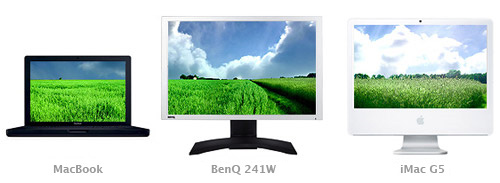
Well, hooking up a 24-inch Benq was not a problem — it is connected to the mini-dvi port of the notebook. And the iMac joined the bunch through the firewire. Care to know how this worked? Read on!
Despite the fact that the iMac is a full-fledged computer, I was interested only in the screen. I wanted to end up with a unified desktop so that I could drag objects with a single mouse across all three monitors. Very handy.
I found an application called ScreenRecycler, which allows setting up connections between two machines using VNC (supports various platforms) for the purpose of using the other computer’s screen. There is a similar program called Synergy but it appeared to me as way too complicated for I am just a designer. I installed client and server applications on both computers and it worked:

Unfortunately the virtual screen was too slow. Really, exchanging data between the computers via the wifi is not the fastest way. Thank God macbooks are equipped with firewire ports. I connected computers with a firewire cable and turned wifi off on the iMac. That sped up things a lot.

Now I had to set up the location of monitors in MacOS. My setup looks like this:

This configuration worked on my desk for two weeks straight in a row. Although I had to buy a $30 ScreenRecycler license, but still there is a free Synergy out there. I have icq and gtalk on the notebook’s screen, a mail client and a client’s brief on the virtual screen and the main monitor is inhabited by Photoshop and Illustrator. Very convenient!
Categories
- Adobe Illustrator (15)
- Adobe Photoshop (4)
- Basecamp (3)
- Books (3)
- Case Studies (11)
- Criticism (6)
- Desktop (2)
- Fundamentals (8)
- Future (3)
- Icon design (25)
- iPhone (2)
- Marketing (1)
- Master-class (20)
- Productivity (3)
- Reviews (13)
- Tools (14)
- Turbomilk (2)
- Usability (7)
- Visual style (4)
Terms of Use

These materials can be used for any purposes with obligatory indication of the author.
Leave a comment
You can log in with your twitter or facebook accounts. After authorisation on one of this sites, you'll be able to leave comments here.
If you have an OpenID (for example myopenid.com), use it to authorise.
Log in with your Turbomilk account or register a new one.