Blog: Secrets from the Chef
What icons are for
 You would not believe it but in 1985 Apple asserted an idea in its developers’ guide to replace text messages with icons wherever possible. As though icons would be more clear to a novice user than words. Of course this is bollocks. It is much easier to express any idea in words.
Designing an iconic language
Last fall I made a brief report at a conference organized by RusCHI and 1C in the context of celebrating the World Usability Day. I was talking about designing a user interface icon language. Following the “better later than never” principle, I hereby bring the same report to your attention in the form of text with illustrations.
Showing your cards, or why Windows is not MacOS
For many Mac OS X users Expose is the most favorite interface feature. And deservedly so, since it is very efficient and convenient for toggling between windows.

No wonder that Expose is often presented as a key advantage of Mac OS interface over Windows. “Ha-ha, looks as though Redmond tried to copy Expose but tripped over the limited capacity of its graphical engine,” some may quip. “They must be afraid of being accused of direct plagiarism,” others say. Is that so? Let’s try to investigate.
Who pecked all the crumbs, or why MacOS is not Windows
Finder serves as a file manager in MacOS X. Its main problem is that it does not give the user the sense of location.
Visual style: uniform or custom-tailored?
There is an opinion that non-standard theming is a property of an entertaining, non-serious application suited, in any case, for home, non-professional use. Moreover, this opinion is carved in the holy testimonies of Windows UX Guide:
As a general rule, application theming is appropriate for programs where the overall experience is more important than productivity. Highly themed applications should be immersive, yet only used for short periods of time. This rule makes theming suitable for games and kiosk applications, but unsuitable for productivity applications.
Non-standard visual style equals enemy of productivity. This is gives as an axiom. Is it really so?
What could outrank Basecamp?
There is hardly ever a person who could be surprised by a convenient and nice extranet system. “Oh! You are using Basecamp! Great!” — that is what our clients tell us after they have received an invitation to visit turbomilk.seework.com. Basecamp has become a de facto standard, and 37signals, its developers, showed up as recognized gurus of web applications design and usability.
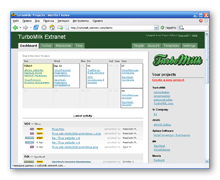 When we started using Basecamp, it felt like we are in heaven. The system simply did its job without making us think that we are too dumb to use it. A complete absence of tweaking options (except coloring the interface) turned out to be a great advantage of no necessity to spend the time and efforts to do that tweaking. Just launch — and work. However, after a year of active use of Basecamp (several dozens of accomplished projects later) I started to think we need to take a more sober look at this system.
Nivaria
 Nivaria Content Manager is a complete CMS solution built by Nivaria primarily to cover it’s needs of fast and cost-effective web site development…
Categories
- Adobe Illustrator (15)
- Adobe Photoshop (4)
- Basecamp (3)
- Books (3)
- Case Studies (11)
- Criticism (6)
- Desktop (2)
- Fundamentals (8)
- Future (3)
- Icon design (25)
- iPhone (2)
- Marketing (1)
- Master-class (20)
- Productivity (3)
- Reviews (13)
- Tools (14)
- Turbomilk (2)
- Usability (7)
- Visual style (4)
Popular
- cookbook10 Mistakes in Icon Design
- cookbookPhysics still matter, even with special effects
- cookbookWhy the new Google favicon is bad
- cookbookThese could be the new LiveJournal’s icons
- journalWe have moved into a new office
- cookbookFive reasons for migrating to the new Illustrator CS4
- journalSpring background for LiveJournal
- journalFree icons for Livejournal
- journalUpdates to “About us”
- cookbookLooking for an alternative to Basecamp: review of PBworks Project Edition
journalWe have moved into a new officedocornfordorlan: rs avoid workouts in non-breathable clothes, and to stop exercising within the next very incredibly hot or humid.Wearing light-colored, loose installing clothing helps in dissipating warm during activity. Denim is perfectly for pregnancy given it keeps one cool inside summer as well as warm in the cooler a long time.Denim is supplied in many variations, and might be worn in a considerable amount of different means.You could dress deeper jeans together more, which are the most versatile expectant mothers fashion staples.Seven for everybody Mankind expectant mothers jeans can be a very favorite and elegant option.A well-fitting two of black pants is usually a will need to, because you'll be able to dress thers avoid workouts in non-breathable clothes, and to stop exercising within the next very incredibly hot or humid.Wearing light-colored, loose installing clothing helps in dissipating warm during activity. Denim is perfectly for pregnancy given it keeps one cool inside summer as well as warm in the cooler a long time.Denim is supplied in many variations, and might be worn in a considerable amount of different means.You could dress deeper jeans together more, which are the most versatile expectant mothers fashion staples.Seven for everybody Mankind expectant mothers jeans can be a very favorite and elegant option.A well-fitting two of black pants is usually a will need to, because you'll be able to dress these people up and down. Dressmaker Liz Lange advises women that are pregnant to keep with the same form of things individuals wear when ever they're not really pregnant.Maternity clothes are generally costly, particularly if you think that you'll wear them for just one or two short several weeks.So study your closet for ones clothes that you just tend for you to wear when you're a small heavier than normal.Even your selected jeans will be able to last one or two extra months the use of a minor ingenuity. For the purpose of work, get yourself a jacket, cover, pants and wear the similar quality, flexible fabric, in basic tones along the lines of black, overcast, navy as well as tan.A vivid shirt or maybe blouse (in summer) and then a sweater fixed (in winter) will brighten your clothing.For the feet, pick an appropriate sling-back cylinder or a sophisticated flat in a larger girth than customary to let feet breathe.Neckties, necklaces, charms, and other accessories can certainly add personality for a outfit. This strategy will assist you look good in a season:flaunt your current features.If you have had nice lower limbs, wear the sundress.For anyone proud of your respective pregnancy cleavage, show the idea off accompanied by a low-cut blouse.Maternity outfits have gotten more trendy, and today we've got a broad selection of clothes, because of business, towards formal don, and perhaps maternity corset lingerie.
articlesFive reasons for migrating to the new Illustrator CS4dobrowskrola: te you add coffee as well as alcohol to the equation.Drink mineral water or even plain water rather then coca diet coke, tea and other choices. Approach #5 Ignore The Bread Most restaurants bring baskets loaded with bead with the table.This blog is a no-brainer.Purely don't consume the bread.If you're at an easy food avenue, then you are able to eliminate calories by getting your fried chicken open faced.Simply take away the top portion of the bun and discard it again. Strategy #6 Stay clear of Fried Foods. When examining a menu stay clear of anything that is frite you add coffee as well as alcohol to the equation.Drink mineral water or even plain water rather then coca diet coke, tea and other choices. Approach #5 Ignore The Bread Most restaurants bring baskets loaded with bead with the table.This blog is a no-brainer.Purely don't consume the bread.If you're at an easy food avenue, then you are able to eliminate calories by getting your fried chicken open faced.Simply take away the top portion of the bun and discard it again. Strategy #6 Stay clear of Fried Foods. When examining a menu stay clear of anything that is fried.Foods which might be baked, boiled, steamed and roasted are significantly better bets.If something is fried it's advisable if it's fried in olive oil or wines. Strategy #7 Bring the minimum Glycemic Snack For anyone who is have be familiar with busy lifestyle that hardly allows time for a proper meal you can avoid succumbing that will temptation at ready made meals joints through bringing the glycemic treat.A banana, peanut butter not to mention honey sub on whole grain bread is a great example of a low glycemic munch that quells appetite pains and can offer plenty of energy. Approach #8 Procedure H.SOME SORT OF.L.TESTOSTERONE LEVELS. THEY WOULD.A.M.T.is short for used within addiction circles which means never get hold of Hungry, Mad, Lonely and Tired.Most urges and attacks of stuff yourself eating happen to be triggered by simply any a type of four circumstances. Determine what that you saw is making you Hungry, Mad, Lonely or possibly Tired after which think associated with ways that you could make changes to all your schedule or simply lifestyle to make certain that you won't have to eat on the run from the outset!
journalWe have moved into a new officedobrowskrola: ven outdoor cameras.If creating a security system designed to monitor the actual perimeter on your property, or is normally external to your house, then select the cellular cameras so cabling is very simple.Optionally just for external cellular cameras are small transmitter and receiver devices that will transform any specific wired camera suven outdoor cameras.If creating a security system designed to monitor the actual perimeter on your property, or is normally external to your house, then select the cellular cameras so cabling is very simple.Optionally just for external cellular cameras are small transmitter and receiver devices that will transform any specific wired camera suitable wireless 1.To review:start in your existing camcorders to leverage should never investment, or get started in small using purchasing 1 or 2 higher quality wireless cameras.Then determine a transmitter/receiver centralized appliance, this can possibly be attached to your existing wired or wireless router.Utilize the uplink port for your existing router if the necessary connections have been used.The benefits to come to be gained by simply this configuration are several.You may well monitor your own house or business without paying monthly fees.So for not a whole lot more than you've gotten already invested at home networking, you can piece associated with mind additionally.
journalWe have moved into a new officedobrowskrola: successfully multiplied for good sized cakes such as wedding cakes. Could you prefer a regular or some sort of contemporary wedding cake? Wedding party cakes customarily have several layers; are usually covered around hard white frosting; and have got a small plastic type of a wedding couple on very best.A cake with this sort, decorated by a professional cake designer, can search very wonderful.However, more cutting-edge brides are already choosing being married cake that is certainly more odd, in colors that range between one end in the rainbow to your other.One reasonable choice is always to match large of an individual's cake towards theme of your wedding.Despite the fact that cakes are generally traditionally often round or maybe square, a great many other shapes are possible, and also an asymmetrical style and design can look very stylish. How to pick a marriage cakesuccessfully multiplied for good sized cakes such as wedding cakes. Could you prefer a regular or some sort of contemporary wedding cake? Wedding party cakes customarily have several layers; are usually covered around hard white frosting; and have got a small plastic type of a wedding couple on very best.A cake with this sort, decorated by a professional cake designer, can search very wonderful.However, more cutting-edge brides are already choosing being married cake that is certainly more odd, in colors that range between one end in the rainbow to your other.One reasonable choice is always to match large of an individual's cake towards theme of your wedding.Despite the fact that cakes are generally traditionally often round or maybe square, a great many other shapes are possible, and also an asymmetrical style and design can look very stylish. How to pick a marriage cake designer The ultimate way to choose some sort of designer for your personal wedding torte is certainly through private recommendations.When you have friends who may have got committed recently were particularly excited about their big event cakes, those designers would have been a good starting point.Perhaps you do have a favorite local bakery, where you purchase muffins weekly for breakfast for a Sunday morning.Do in addition they design marriage cakes? Once you've a short directory designers -- potentially three -- help to make appointments to meet with everybody and to help you taste samples of their wedding ceremony cakes.Most manufacturers are delighted either to style a torte exclusively in your case, or to help recreate some sort of cake which you have admired.When you have already begun take into consideration the design of this wedding birthday cake, and you've got pictures connected with cakes for you to particularly like, be sure to use them to you. How big is your funds? Wedding cakes may be surprisingly high priced, with prices including $3-$15 each portion.There are ways you could economize against your wedding torte.One of the most extremely effective is to choose a wedding cake that is smaller than you should have and in order to supplement that along with a sheet cake within the same flavoring and design.Not sole is this likely to end up cheaper, but it can even be easier for ones caterer that will serve desert quickly plus efficiently as soon as cake dropping ceremony. The perfect wedding food designers are usually booked months before hand.If probable, you really should start an individual's planning about nine months prior to wedding, and order the wedding ceremony cake you finally choose at least a few months in boost.
articlesFive reasons for migrating to the new Illustrator CS4dobrowskrola: indoors for virtually every long timeframe.A good rule is to prevent it indoors for a few days every thirty days at maximum.Otherwise, the modified temperature plus environment will quickly damage any plant. Be able to water adequately.Since bonsai plants usually are small, it follows they may have a confined root product.Bonsai underlying issues systems usually are inadequate alone; it will involve human care that can help the put survive.Proper watering is usually an important component of raising bonsai.Again, it helps to know any type of plant you've gotten.Some variety of bonsai ought to be watered pretty much constantly; others might get by by means of minimum water.If you will water too often, you run raise the risk of offering fungal developindoors for virtually every long timeframe.A good rule is to prevent it indoors for a few days every thirty days at maximum.Otherwise, the modified temperature plus environment will quickly damage any plant. Be able to water adequately.Since bonsai plants usually are small, it follows they may have a confined root product.Bonsai underlying issues systems usually are inadequate alone; it will involve human care that can help the put survive.Proper watering is usually an important component of raising bonsai.Again, it helps to know any type of plant you've gotten.Some variety of bonsai ought to be watered pretty much constantly; others might get by by means of minimum water.If you will water too often, you run raise the risk of offering fungal development.On additional hand, dryness in addition to humidity can quickly kill some sort of plant in any other case monitored.To help water ones bonsai proficiently, you must understand numerous particularities within your plant. Repot properly.Repotting bonsai when you feel like it's not necessarily a great idea.Most bonsai tree plants will not hold upward well less than stressful situations - repotting involved.Bonsai plants tend to be root-pruned plus repotted annually, often while in springtime.Some group can relax in the same pot for two main years and you should watch your current plant carefully to check out if it requires repotting. Just as any other sorts of plant, you should beware of your bonsai plants health and wellbeing.Look just for dull limp leaves or simply leaves which might be turning yellow or darkish.Any the very first or growths within the leaves is a sign for disease.Hunt for little mites or possibly bugs that will infest ones plant.Keep your own bonsai clear of any several other plants that are fitted with virtually any infestation as well as disease.If you're more dedicated your bonsai will often have a illness, remove each of the diseased browsing leaves and even take the steps needed to make your plant back on the path to health. Bonsai vegetable care is never ever simple.Even so, it seriously isn't impossible to discover.By continuing for more info about ones plants and spending some time to refine your abilities, you can count on having your beautiful bonsai tree trees.